LEGO® DUPLO® World
- 4.2
- Rating
- 10.00M
- Installs
- Free
- Price
 Analysis by App-foxy
When I first opened LEGO® DUPLO® World, I understood its appeal almost immediately: it gives young children a playful space where building, movement, and simple problem-solving sit together. This is an educational game from StoryToys, designed around the familiar DUPLO style rather than around reading-heavy lessons or complicated menus. The result feels more like guided play than traditional studying, which is exactly why it can work well for a child who loses interest in ordinary learning apps.
The game is free to download and suitable for Everyone, so it is an easy option to try on a family device. It has reached over ten million installs and holds an average rating of 4.1 from around twenty-five thousand ratings, which suggests that many families find the general approach worthwhile while still leaving room for individual differences. In my experience, the most important question is not whether a child likes LEGO. It is whether they enjoy experimenting, tapping through a scene, and trying again when an action does not produce the expected result.
What the first play session feels like
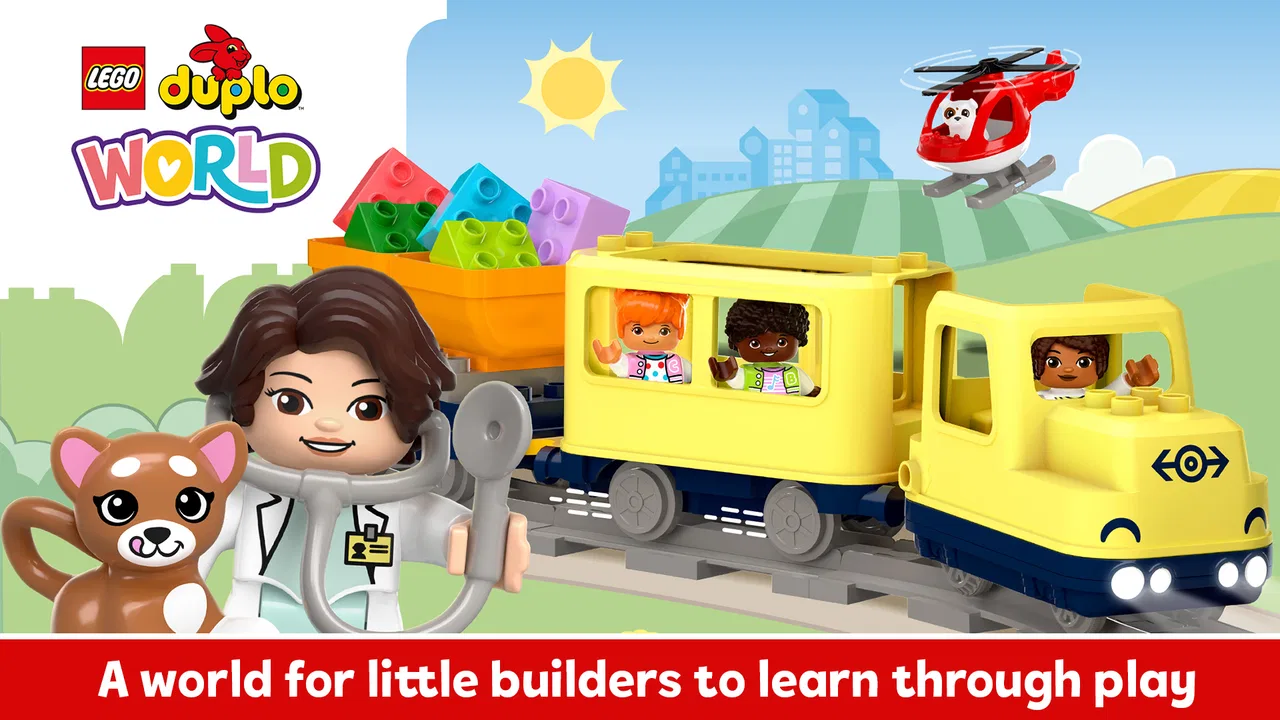
The central idea is simple: children interact with colorful DUPLO-inspired environments and use play to discover relationships between objects, characters, and actions. That makes the experience approachable for preschool users who may not yet be comfortable with instructions. Instead of asking a child to complete a worksheet, the game encourages them to explore and notice what changes when they choose something.
You May Also Like

 Blood Strike: 2.5 Anniversary
Blood Strike’s Loadouts Turn Every Drop Into a Tactical Gamble
A close look at Blood Strike’s custom loadouts: how fast access to signature weapons reshapes its battle royale rhythm, rewards preparation, and narrows the gap between fights.

 Pandora - Music & Podcasts
Pandora’s Music Is Easy to Start, but Harder to Recover
Pandora’s strength is its low-effort path from a seed to a station. Its weak spot is how much confidence it asks you to place in connection, setup, and quiet recovery.

 8 Ball Pool
 Is Built on Rivalries, Rematches, and Routine
A close look at the rivalries, rematches, shared routines, and unanswered safety questions that turn a quick pool match into a persistent mobile community.

 Samsung Music
’s Quiet Strength Is Playing What You Already Own
Its reach comes less from spectacle than from dependable access to a personal library. That simplicity is both the app’s strongest retention engine and its ceiling.

 AccuWeather: Weather Radar
AccuWeather Review: A Quick, Clear Forecast for Everyday Decisions
For everyday plans, the best forecast is the one you can understand quickly. AccuWeather makes rain timing, radar, and local conditions easy to act on, with a few trade-offs.

 Hill Climb Racing
Why Hill Climb Racing Still Turns Crashes Into One More Run
A tiny car, a bumpy hill and one more upgrade: Hill Climb Racing keeps resurfacing because its simple chaos makes every near-miss feel personal.
More From Our News Desk



I would not treat it as a complete early-learning curriculum. It is better understood as a playful supplement for moments when a child needs a short, focused activity. The educational value comes from the way the child observes, chooses, and repeats actions. A parent can turn that into a richer learning moment by asking questions such as “What do you think will happen?” or “Why did that character move?” The app provides the setting; conversation adds much of the deeper value.
The visual presentation is particularly important for first-time users. Young children can often recognize the basic idea of building and pretend play before they understand written directions. That lowers the entry barrier, although it does not remove the need for supervision. A child may know what they want to do but still tap the wrong object, miss a visual cue, or leave the activity before understanding it.
One useful way to approach the game is to keep the first session short. Rather than handing over the device and expecting independent play immediately, I would sit beside the child and let them lead. This reveals whether the controls feel natural to them and prevents the first experience from becoming a test. The goal is a small moment of success, not finishing everything available.
Starting without turning setup into a chore
The game runs on Android devices using at least Android 6.0. On iOS, the practical preparation is the same as with any child-focused game: install it before handing over the device, check the available space, and open it once so you know what the first screen looks like. That small preparation matters because young children are less patient with loading screens, sign-in prompts, or unexpected interruptions than adults are.
Because the game is free to start but includes in-app purchases ranging from $0.99 to $39.99 per item, I recommend checking the purchase controls on the device before a child plays alone. This is not a criticism of the play concept; it is simply sensible family setup. A child may tap brightly presented options without understanding that they can lead to a purchase. I prefer to handle that part myself and explain, in simple language, which choices are available during the current session.
It is also worth deciding where the game fits into your routine. On a shared phone, quick play may be convenient but less comfortable for a child who wants to explore carefully. On a tablet, the larger screen can make objects easier to notice and select. I would choose a quiet place for the first session, because the child needs to see which parts of the scene respond to tapping and dragging rather than competing with a television or a busy room.
The current version is 33.1.1, and the developer is StoryToys. I would still open the game before a planned trip or appointment, rather than assuming every installation will be ready at the exact moment you need it. That is a practical habit with any app used by children, especially when the device may be offline or shared with other family members.
Finding the first meaningful success
For a first successful action, I would avoid giving a long explanation. Let the child choose a visible object, then encourage them to tap or move it and watch the result. If they hesitate, demonstrate one action and immediately hand control back. The important step is for the child to cause something to happen themselves. That creates a clearer sense of ownership than watching an adult complete the scene.
A good everyday example is a short session after preschool while dinner is being prepared. I might sit with a child for a few minutes, ask them to choose what to investigate, and celebrate one completed interaction rather than pushing them through several activities. If they become absorbed, I can ask them to describe what they see. If they lose interest, I can stop without presenting that as failure. This keeps the game connected with curiosity instead of pressure.
One of the more useful techniques is to use prediction. Before the child taps an object, ask what they think it will do. Afterward, ask whether the result matched their idea. This turns a simple interaction into a basic lesson in cause and effect, while still feeling like play. It also helps a parent see whether the child understands the visual language of the scene or is simply tapping randomly.
Another helpful approach is to let the child repeat an action. Adults often want to move on as soon as something has been discovered, but repetition is where young children practice control and memory. If the game presents a playful action that the child enjoys, repeating it can be more valuable than rushing toward a new area. I found that this also reduces frustration because the child gets time to become comfortable with the interaction.
The first win should be the child making a choice and seeing its consequence, not the adult navigating quickly. That distinction makes the game more useful as an educational tool and gives the child a reason to try again later.
Where new users may become confused
The biggest source of confusion is usually not the child’s ability but the difference between decorative objects and interactive ones. A colorful scene can invite tapping everywhere, yet not every visible element will necessarily respond in the same way. When a child says that “nothing works,” I would first ask them to try one clearly noticeable object, then wait for the visual response instead of tapping repeatedly across the screen.
Young users can also move away from an activity before they understand what they were meant to notice. I would not immediately correct them. Instead, I would ask what they were looking for and guide them back with a question. This keeps the child involved and avoids turning the parent into a controller who makes every decision.
Another common difficulty is expecting the game to behave like a construction set in the physical world. The DUPLO theme naturally creates that expectation, but digital play has its own rules. A child may want to build anything in any place, while the app may guide them toward particular interactions. That guided structure is helpful for learning, but it can feel restrictive to a child who mainly wants open-ended building.
This is where the choice between digital and physical play becomes important. A real DUPLO set is better for tactile building, hand strength, and completely free-form construction. This game is better when you want a contained activity with animated feedback and a low risk of scattered bricks. I would use it alongside physical blocks rather than treating it as a replacement.
Parents should also expect different levels of independence. Some children will understand the basic interaction quickly, while others will need an adult nearby to interpret the scene or recover from an accidental tap. The Everyone age rating makes it broadly suitable, but it does not mean every child will navigate it without help. Comfort with touchscreens, attention span, and language development all affect the experience.
Making the educational side count
The game becomes more valuable when the adult adds a little structure without taking over. I like using three simple prompts: ask the child to name what they see, predict an action, and explain what changed. These prompts work because they build vocabulary and observation around the game’s own visual events. They also give a parent a way to participate without needing to know every part of the app in advance.
A second useful habit is to connect the digital scene with something nearby. If the child encounters a vehicle, animal, building, or character, I might ask whether they have seen something similar outside the game. This creates a bridge between screen play and real-world understanding. The app does not have to carry the entire lesson on its own; it can be the starting point for a conversation, drawing activity, or physical building session.
For a child who becomes frustrated easily, I would avoid correcting every mistake. Offer one hint, then let them try again. The game is most effective when the child experiences manageable discovery. Too much adult direction can make it look as though the child is following instructions rather than learning through play.
There is also a practical trade-off in the app’s simplicity. Children who need explicit phonics, number practice, handwriting, or a clear progress path will probably find dedicated educational apps more suitable. This game supports exploration and early reasoning, but I would not choose it as the main tool for a specific academic goal. Its strength is engagement through familiar imaginative play, not formal instruction.
What to try after the first session
Once the child understands that their actions affect the scene, the next step is to give them more control. Let them choose the activity and explain their choice. If they return to the same interaction repeatedly, use that interest as a starting point rather than forcing variety. A child who keeps returning to one type of scene may be practicing a skill, enjoying a particular character, or simply looking for predictability.
I would also create a clear stopping point. Saying “one more action, then we put the device away” is more helpful than removing the device without warning. Since the game is designed for young children, short sessions are usually easier to manage than leaving it available indefinitely. The aim is to make returning to the game feel positive, not to fill every quiet moment with screen time.
If you are deciding whether to pay for additional content, first watch how the child uses the free portion. Do they explore independently after the initial guidance? Do they ask to return because they are curious, or only because the screen is available? Those answers are more useful than buying immediately. The purchase range is wide enough that I would make any decision based on sustained interest and the family’s budget, not on the assumption that more content automatically means more learning.
Compared with general preschool video apps, this offers more interaction and more opportunities for the child to cause visible changes. Compared with structured learning programs, it feels less demanding and less measurable. Compared with physical DUPLO, it is cleaner, quicker to start, and easier to use when you are away from home, but it cannot provide the same tactile feedback or truly unlimited construction.
That comparison also shows who should skip it. I would look elsewhere if your child wants competitive challenges, advanced puzzles, detailed building tools, or a clear reward-and-progress system. I would also skip it as a primary choice if you want lessons that directly target reading, arithmetic, or writing. In those cases, a specialized educational app or hands-on activity will be a better match.
My recommendation for families trying it first
After spending time with it, I see LEGO® DUPLO® World as a friendly introduction to digital learning through imaginative play. StoryToys has chosen an accessible theme and a gentle style that can help a young child feel capable rather than tested. Its best moments come when a child explores an object, predicts a result, and then explains what happened in their own words.
The free entry point makes it reasonable to try, but parents should remember the available in-app purchases and decide how they want those handled before independent play. I also recommend treating the game as a shared tool at first: prepare the device, demonstrate one action, let the child repeat it, and use questions to turn the interaction into conversation.
My final view is positive, with a clear boundary. This is not a replacement for real DUPLO bricks, outdoor play, books, or focused learning software. It is a well-suited option for a short, calm activity in which a child can explore, imagine, and learn through consequences. If that is what you need, I think it is worth installing and giving your child a guided first session. If you need measurable academic practice or unlimited construction, choose a more specialized alternative instead.
FAQs for LEGO® DUPLO® World
01What is LEGO® DUPLO® World and who is it designed for?
LEGO® DUPLO® World is an educational app designed for young children, typically aged 2 to 5 years. It offers interactive play experiences that help develop early learning skills such as counting, problem-solving, and creativity. The app features various themed worlds that are both engaging and educational, making it perfect for preschoolers.
02Does LEGO® DUPLO® World require an internet connection to play?
LEGO® DUPLO® World can be played offline, making it convenient for travel or areas with limited internet access. However, an internet connection is required for downloading the app, accessing updates, and purchasing additional content. Parents can ensure a safe and consistent experience by managing these settings.
03Are there in-app purchases in LEGO® DUPLO® World?
Yes, LEGO® DUPLO® World includes in-app purchases. While the app offers a range of free content, additional worlds and features can be purchased. Parents should be aware of these options and may want to enable parental controls to manage purchases and spending within the app.
04Is LEGO® DUPLO® World safe for children to use?
LEGO® DUPLO® World is designed with children's safety in mind, offering a secure environment with no third-party advertising. The app includes parental controls and a child-friendly interface. Parents can feel confident knowing that the app adheres to strict privacy standards and provides a safe digital playground for kids.
05Can multiple children use LEGO® DUPLO® World on the same device?
Yes, multiple children can enjoy LEGO® DUPLO® World on the same device. The app encourages collaborative play and sharing, making it easy for siblings to take turns or play together. Parents can set up different profiles or simply manage turns to ensure a harmonious playtime experience.
Pros
- Engaging educational content for young children.
- Colorful graphics that attract kids' attention.
- Easy-to-use interface designed for toddlers.
- Variety of mini-games keeps content fresh.
- Encourages creativity and problem-solving skills.
Cons
- Limited content available in the free version.
- Requires internet for some features.
- In-app purchases can add up.
- May not hold older children's interest.
- Occasional performance lags on older devices.

LEGO® DUPLO® World
Gallery